Struggling with low visibility, poor rankings, or messy SEO data is a common challenge for many businesses trying to grow online. Understanding how to create account in ahrefs is the first step toward unlocking a powerful SEO tool setup that improves SEO performance tracking and delivers actionable insights.
A proper Ahrefs account setup ensures smooth SEO project management, accurate keyword tracking, and effective backlink monitoring from the start. With features like Google Search Console integration, Ahrefs Webmaster Tools, and domain verification, you can streamline SEO data analysis and uncover real link building opportunities.
Whether you’re working on SEO reporting dashboard optimization or improving SEO workflow optimization, a structured setup helps businesses use Ahrefs pricing plans efficiently and build a strong SEO project structure for long-term growth.
Getting started with Ahrefs can feel confusing at first. If you want to quickly find quality websites to test your new Ahrefs strategies, you can explore a curated list of high-authority sites. This helps you practice backlink analysis and keyword research effectively without guessing which sites are valuable.
How to create account in ahrefs
Setting up your SEO tools correctly is the first step toward scalable growth. This guide shows you how to create account in Ahrefs in just a few minutes, so you can unlock keyword research, backlink data, and competitor insights that help improve rankings, traffic, and overall SEO performance.
What Is Ahrefs and Why Should You Use It?
Ahrefs is an SEO tool that helps you grow your website traffic.
You can use it to:
- Find keywords people search on Google
- Analyze competitors
- Check backlinks
- Track rankings
👉 In simple words: it shows you what’s working in SEO—and how to copy it smartly.
How to Create Account in Ahrefs (Step-by-Step)
Here’s the exact process to create an Ahrefs account step by step:
Go to the Official Website
Open your browser and search for Ahrefs.
Click on the official website.
Click “Start Free Trial” or “Get Started”
On the homepage, you’ll see a button like:
- Start trial
- Get started
Click it to begin your ahrefs account setup.
Choose a Subscription Plan
Ahrefs is a paid tool, so you’ll need to select a plan.
Ahrefs Pricing Overview (Simple)
- Lite – Good for beginners
- Standard – Best for freelancers
- Advanced – For agencies
- Enterprise – For large teams
👉 Tip: Start small. You can upgrade anytime.
Enter Your Details
Fill in:
- Email address
- Password
- Payment info
Make sure your email is correct.
Verify Your Email
Ahrefs will send you a verification link.
- Open your inbox
- Click the link
Now your account is ready ✅
How to Login to Ahrefs (Quick Guide)
Once your account is created:
- Go to the Ahrefs website
- Click Login / Sign in
- Enter your email and password
- Click login
👉 That’s it—you’re inside your dashboard.
Ahrefs Dashboard Overview (Beginner Friendly)
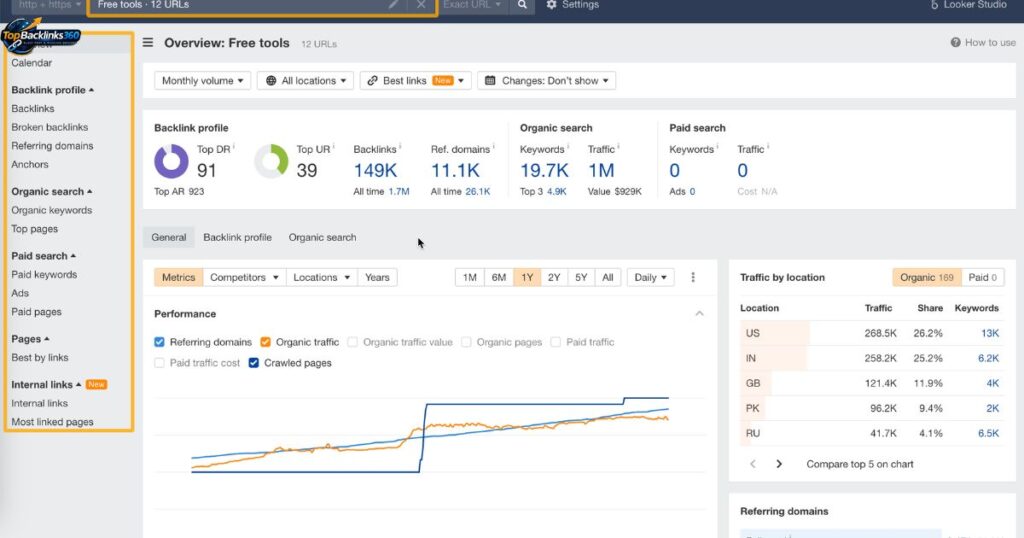
When you log in, you’ll see the main dashboard.
Key Sections You Should Know
- Site Explorer – Check backlinks and traffic
- Keywords Explorer – Find keyword ideas
- Site Audit – Fix SEO errors
- Rank Tracker – Track keyword rankings
👉 Don’t try everything at once. Start with one tool.
How to Use Ahrefs for Beginners (Real Examples)
Let’s make this practical.
Example 1: Keyword Research (Easy Method)
- Go to Keywords Explorer
- Type a topic (e.g., “SEO tips”)
- Check:
- Search volume
- Keyword difficulty
Tip:
- Pick keywords with:
- Low difficulty
- Good search volume
👉 Example:
Instead of “SEO”, target
“SEO tips for beginners”
Example 2: Backlink Analysis (Simple)
- Open Site Explorer
- Enter competitor website
- Go to the Backlinks section
You’ll see:
- Who links to them
- Which pages get links
👉 Use this to:
- Find guest posting sites
- Build backlinks (your expertise 😉)
Example 3: Content Gap Strategy
This is powerful.
- Enter your site
- Add competitors
- Use the Content Gap tool
👉 It shows keywords:
- Your competitors rank for
- But you don’t
This is pure opportunity 🚀
Ahrefs Keyword Difficulty Explained (Simple)
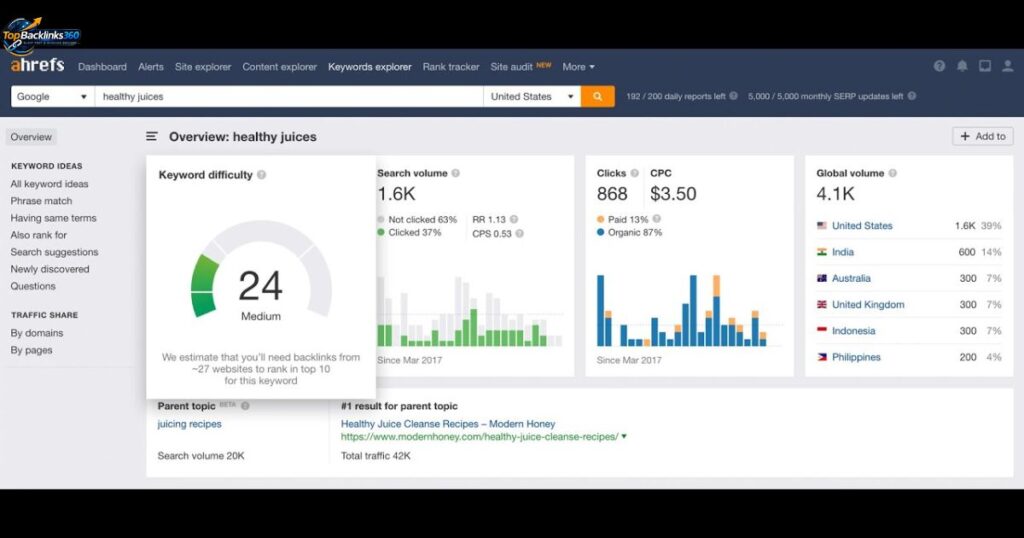
Keyword Difficulty (KD) shows how hard it is to rank.
- 0–10 → Easy
- 10–30 → Medium
- 30+ → Hard
👉 Beginners should target low KD keywords first.
Common Ahrefs Login Problems (And Fixes)
Facing issues? Here’s how to fix them.
Wrong Password
- Click “Forgot Password”
- Reset via email
Email Not Verified
- Check your inbox or spam
- Click the verification link
Account Not Working
- Check payment status
- Contact support
Browser Issues
- Clear cache
- Try another browser
Ahrefs Account Security Tips
Keep your account safe:
- Use a strong password
- Don’t share login details
- Enable secure email
- Log out of shared devices
Ahrefs vs SEMrush (Quick Comparison)
| Feature | Ahrefs | SEMrush |
| Backlinks | Strong | Good |
| Keywords | Excellent | Excellent |
| UI | Simple | Slightly complex |
| Best For | Link building | All-in-one marketing |
👉 If your focus is backlinks → Ahrefs is better.
Internal SEO Tips You Should Not Miss
Once your account is ready, focus on:
- Keyword research
- Backlink building
- Content gap analysis
- Ranking tracking
👉 These 4 areas drive most SEO results.
Conclusion
Now you know exactly how to create account in Ahrefs and actually use it. But here’s the truth: Creating an account is easy.
Using it smartly is what brings results.
Once you understand how Ahrefs works, it’s also important to track which backlinks are truly live and valuable. Learning how to identify active links can improve your SEO strategy and ensure your efforts drive real traffic.
👉 Start with:
- Low competition keywords
- Competitor backlinks
- Simple SEO strategies
Stay consistent—and you’ll see growth.
FAQs
How do I log in to Ahrefs?
Go to the Ahrefs website, click login, enter your email and password, and access your dashboard.
How to create an Ahrefs account?
Visit Ahrefs, choose a plan, enter your details, verify your email, and your account is ready.
Why can’t I log into Ahrefs?
It could be due to a wrong password, an unverified email, or payment issues. Reset or verify to fix it.